
Project management software for banks needs to be secure, GDPR-compliant and simple enough for every department to use, including less tech-savvy teams. MeisterTask meets these requirements with ISO/IEC 27001:2022 certification, servers in Germany, and role-based permissions.
How does project management software help banks?
If your team is still managing your projects with a mix of in-person meetings, calls, emails and even sticky notes, you know how ineffective this can be. By centralizing your team’s work online, task management software:
Reduces the need for in-person communication and paper-based processes
Stops important information falling through the cracks
Ensures decisions, deadlines and responsibilities are documented transparently, so teams and individuals are more accountable
In banking, project management software can be the difference between complying with regulations and failing to do so. Ultimately, without a way to maintain a clear overview of requirements, your company is exposed to risk. This could result in a hefty fine, damage to your company’s reputation, or worse.
That’s why the question isn’t whether you need a task management tool, but which tool is right for your organization.
What to look for in project management software for banks
There are a lot of task management tools out there, but very few will tick every box. You don’t want to waste time testing a tool that doesn’t meet industry standards, or onboarding your team to a tool they won’t use. With this in mind, we’ve compiled a list of questions you need to ask before choosing your new task management software.
Here's how the five criteria look as a quick checklist, and how MeisterTask covers each one:
Security: ISO/IEC 27001:2022 certification, servers in Germany, role-based permissions, SAML 2.0 and 2FA.
Usability: a clear interface, Kanban boards with drag-and-drop, and free courses in the MeisterTask Academy.
Scalability: project templates, automations, and integrations with Google Workspace, Google Drive, OneDrive, and Slack.
Collaboration: Notes linked to tasks and projects, plus a Guest role for external partners.
Reporting: Reports with custom filters and Excel export for audits.
1. How secure is it?
A project management tool for banks needs role-based permissions, secure data storage and a recognized security certification such as ISO/IEC 27001. Tools hosted in the EU also make GDPR compliance easier and support your organization's digital sovereignty.
Security and compliance will be key drivers in your decision. Any task management tool you adopt must include secure data handling and role-based permissions as standard. Your task management software should also be certified to ISO/IEC 27001:2022, the world’s leading security standard. A missing certification will help you filter out non-compliant tools from your shortlist.
Thinking of trying out a U.S. based task management tool? Check where your data is stored and how transfers outside the EU are handled, because this usually means extra legal checks for your compliance team. A data breach could be catastrophic for your organization, causing long-term damage to your reputation and harming consumer trust.
Why MeisterTask is a safe choice
MeisterTask is ISO/IEC 27001:2022-certified and fully GDPR-compliant, with servers based in Germany. This means you can be sure your data is safely stored and won’t be shared without your permission.
Aside from its intuitive user interface, MeisterTask's server location was a deciding factor for us. The security of our data is of utmost priority. With MeisterTask, we know that our data is stored in Germany and protected by rigorous security and privacy measures.
 KE
Katja Esch
IT Project Leader, LBBW
With MeisterTask, you can:
Restrict access to certain features by role. Restrict access to certain features for team members and collaborators via permissions. This allows you to control who can use or edit integrations, analytics, and more.
Restrict access to data on a project basis. If a project contains sensitive data that only specific team members should have access to, you can define these roles on a project level to ensure it stays confidential.
Add an additional layer of security. Enable SAML 2.0 and 2FA to keep your account secure while maintaining a quick, easy login process for team members.
We have approval from the auditing association to upload confidential data to the apps. This makes work easier because you don’t have to think twice when you upload a sensitive file to a task or project.
 SK
Sebastian Kraft
Head of Bank Administration, IT and Digital Transformation, VR-Bank Würzburg
2. How user-friendly is it?
The software has to be simple enough that risk, legal and HR teams can use it without lengthy training. Information only stays in one place if everyone actually uses the tool.
Before committing to a task management tool, ask yourself: will everyone in your organization be able and willing to use the software?
Banking projects often involve multiple stakeholders across departments, from risk management to legal to HR. Depending on their role, some stakeholders will be more tech-savvy than others. The task management software you choose therefore needs to be:
Flexible enough to support complex workflows and
Straightforward enough for everyone to use
High adoption rates are key to the long-term success of any new technology you introduce. Tools that are too complex or overloaded with features can put team members off. They’ll turn to different ways of managing their work as a result. Information will be siloed within teams, leading to collaboration issues.
How MeisterTask supports adoption
Introducing new software doesn’t need to be frustrating, despite what you might have experienced before. With MeisterTask, your team can:
Get started quickly. MeisterTask has a clean, straightforward design, with only the features your team needs to work productively. This means they can focus on the work that matters, rather than spending time navigating the tool. As it’s easy to use, they can also get started quickly with minimal onboarding.
Users have no problem getting to grips with MeisterTask. It’s intuitive, easy to use and centralizes communication.
 HJ
Herfurth Justus
Manager Digital Financial Services, Tabularaza by zeb
Manage tasks, projects and daily work with ease. MeisterTask’s Kanban boards and Timeline provide a clear visual overview of work to help you stay on top of progress. The drag-and-drop function makes it easy to manage tasks and update their status for transparent workflows. As a result, everyone in your organization, regardless of tech experience, can proactively manage their work independently.
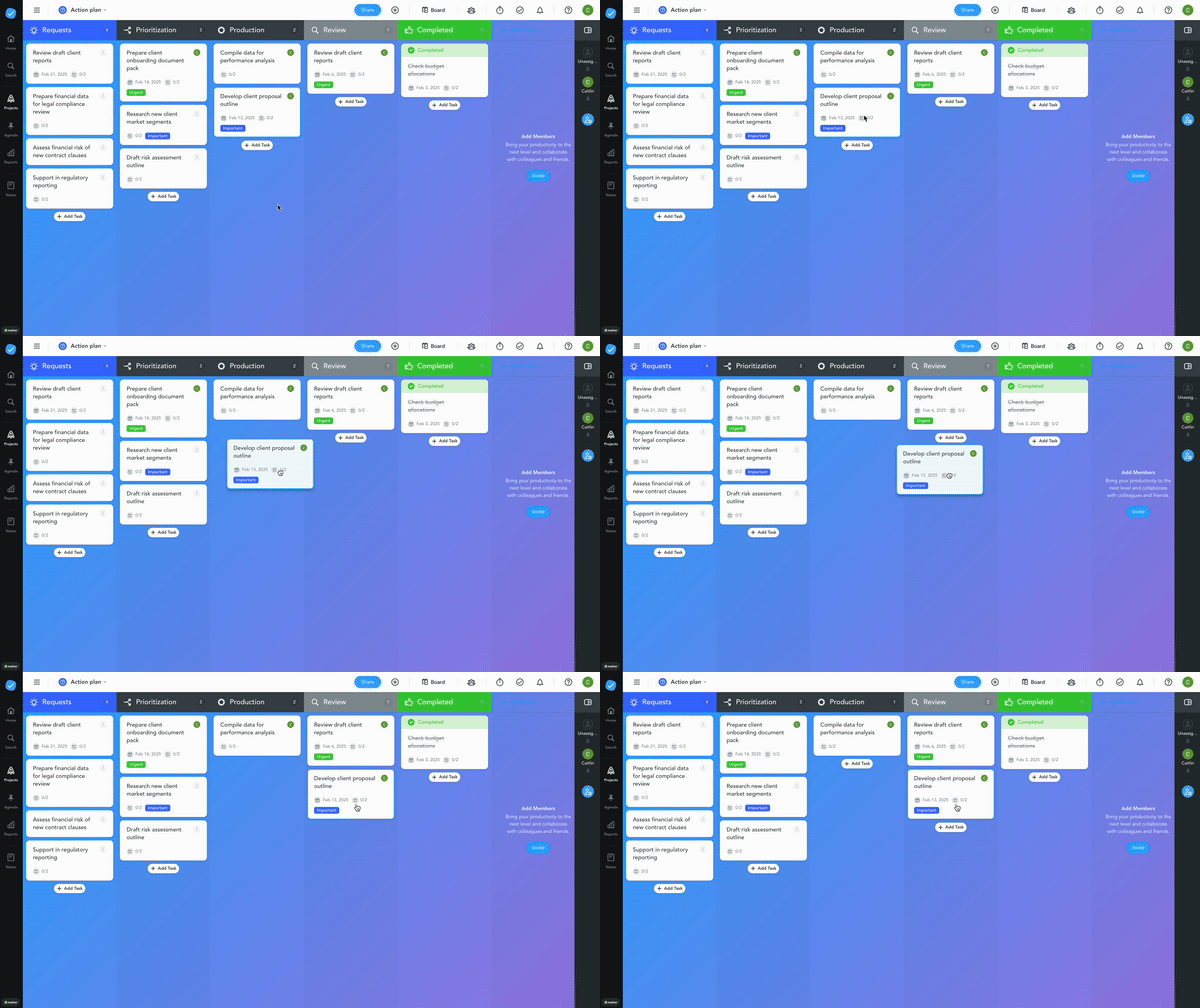
Get tailored support from a dedicated team of experts. MeisterTask might be straightforward, but that doesn’t mean you’re on your own. We provide tailored support to help your team get the most from the software. There are also many resources available at your convenience. Free, interactive courses are available in the MeisterTask Academy, and you’ll find practical tips and advice from other users and experts in the community.
3. How scalable is it?
A scalable tool grows with new regulations, branches and markets, so you don't have to switch tools later. Look for templates, automations, and integrations, like these task management templates for banks.
It takes time to reach peak efficiency with new software. When you change tools too often:
Team members become frustrated
Productivity is disrupted
Work has to be imported from the old tool to the new, which requires new policies and documentation
It’s a drain on your resources.
That’s why, no matter whether you’re responding to new regulations or expanding into new markets, your software needs to adapt with you. A scalable task management tool ensures teams can work together effectively without interrupting productivity.
Why MeisterTask is a scalable solution
MeisterTask’s flexibility means it grows with you. You can:
Adapt it to your team’s way of working. MeisterTask’s project boards follow the simple Kanban principle, but you can easily change them to suit your workflows. Edit section headers, define color-coded tags, add task dependencies and utilize subtasks to bring clarity to larger projects.
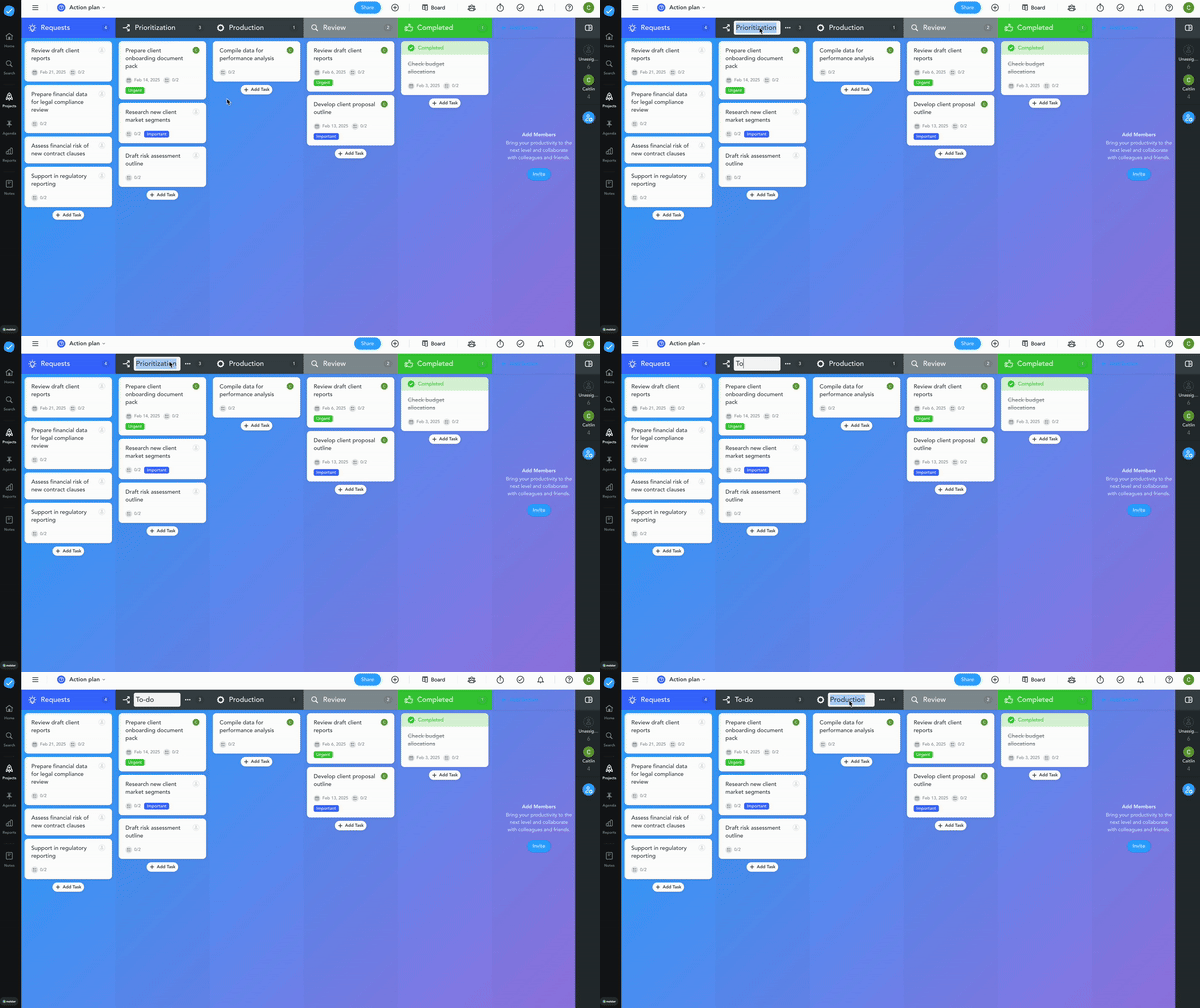
Automate repetitive tasks. Automations help workflows run seamlessly while reducing admin and saving your team time. For example, you can create recurring tasks with custom fields and checklists for tasks that pop up every week or month. Or automatically assign tasks to a team member and trigger an automated email alert.
Templatize work easily. Not only do MeisterTask templates make setting up and managing projects quicker and easier, they also help you ensure processes and workflows remain consistent across branches, regions and departments. By templatizing work, you increase alignment and improve output quality.
Explore all MeisterTask templates for simple, efficient task management.
Build and expand your workflows with integrations. MeisterTask integrates with popular tools to help you keep your work centralized. For example, you can connect Google Workspace, Google Drive, OneDrive or Slack, and import existing project data from Excel.
4. How effectively does it streamline collaboration?
Good collaboration takes more than comments. Documents, tasks and responsibilities should be linked in one place, and external partners should only see what they need to see.
All good task management tools offer basic features like comments and real-time notifications. And these are often enough to improve communication. Ultimately, the best task management app for collaboration is one that everyone can use.
But what if a quick comment isn't enough? Effective teamwork also requires easy information sharing. That’s why you should choose a task management tool with documentation functionality. Whether it’s regulatory reports, risk assessments, or internal policies, a tool with this feature keeps all information safe and easy to access. By linking information to tasks and projects, team members get the context they need to collaborate smoothly and work independently.
How MeisterTask helps you to collaborate effectively
MeisterTask’s straightforward navigation and carefully selected collaboration features help you to work effectively as a team. With MeisterTask, you can:
Ensure accountability and ownership. Comments, task assignees, and deadlines ensure stakeholders know who is working on what, when. Task dependencies give your team an overview of how tasks are connected so they can see how their work fits into the bigger picture.
Create professional documents easily. Preformatted text blocks and design elements help you make professional-looking documents quickly, so you can focus on priority work. Collaborate on documents as a team, and get feedback or edits asynchronously to keep progress moving. As Notes live in MeisterTask, you don’t need to switch between tools to access important information.
Work with external stakeholders securely. Roles and permissions give you control over who can access, edit and share data. Assign the Guest role to external collaborators, limiting their visibility to only what you want them to see.
5. How easy is monitoring and reporting?
Banks need reports that show progress and compliance at a glance and can be exported for audits. The simpler the filters, the fewer errors creep in.
Reporting is critical not only for tracking project progress but also for ensuring regulatory compliance. The ability to produce accurate reports is essential to maintain transparency, mitigate risks and meet audit requirements.
However, many reporting dashboards can be overwhelming and difficult to navigate, especially for those unfamiliar with data management. Information overload increases stress and can lead to confusion and errors, causing significant problems down the line.
An easy way to filter and view task and project data helps ensure consistent, accurate reports, so you can make informed strategic decisions.
How MeisterTask makes reporting easy
By making reporting simple and accessible, MeisterTask helps you to:
Keep important information at hand. All documentation and project details are securely stored in MeisterTask and can be revisited at any time, even after a project is closed, ensuring nothing is lost or overlooked.
Ensure data is easily accessible. With Reports, you get a clear visual overview of task completion rates, team performance, project status and more. This makes it easy to track progress and share insights with stakeholders. You can also create a custom report by choosing your own filters and generating analytics tailored to your needs. For easy sharing, export your report as an Excel document(XLS) or CSV file.
Choosing the right tool for your bank
In banking, where compliance and security are paramount, choosing the right task management tool is essential. Many tools lack the security and protections your bank needs to meet industry requirements. Those that do still often fall short on usability, which makes company-wide adoption difficult.
Knowing what to look for will help you save time and money in the long run. Ultimately, MeisterTask, the secure work management platform for teams, offers everything your team needs to stay organized, work efficiently, and collaborate seamlessly, all while keeping your data secure.