Mueve subtareas con su tarea principal
Mueve una tarea principal a otra sección y elige si sus subtareas la acompañan, estén donde estén en el proyecto.
Aprender másLas últimas mejoras de MeisterTask.
Mueve una tarea principal a otra sección y elige si sus subtareas la acompañan, estén donde estén en el proyecto.
Aprender másConsulta el comentario al que alguien responde directamente en los correos de respuesta de tus notas, con un enlace al hilo completo cuando haya más mensajes.
Ahora recibirás un aviso al añadir o mover una tarea que supere el límite de trabajo en curso (WIP) de una columna.
Empieza con enlaces a artículos del Centro de ayuda, descubre las novedades de MeisterTask o ponte en contacto con nuestro equipo.
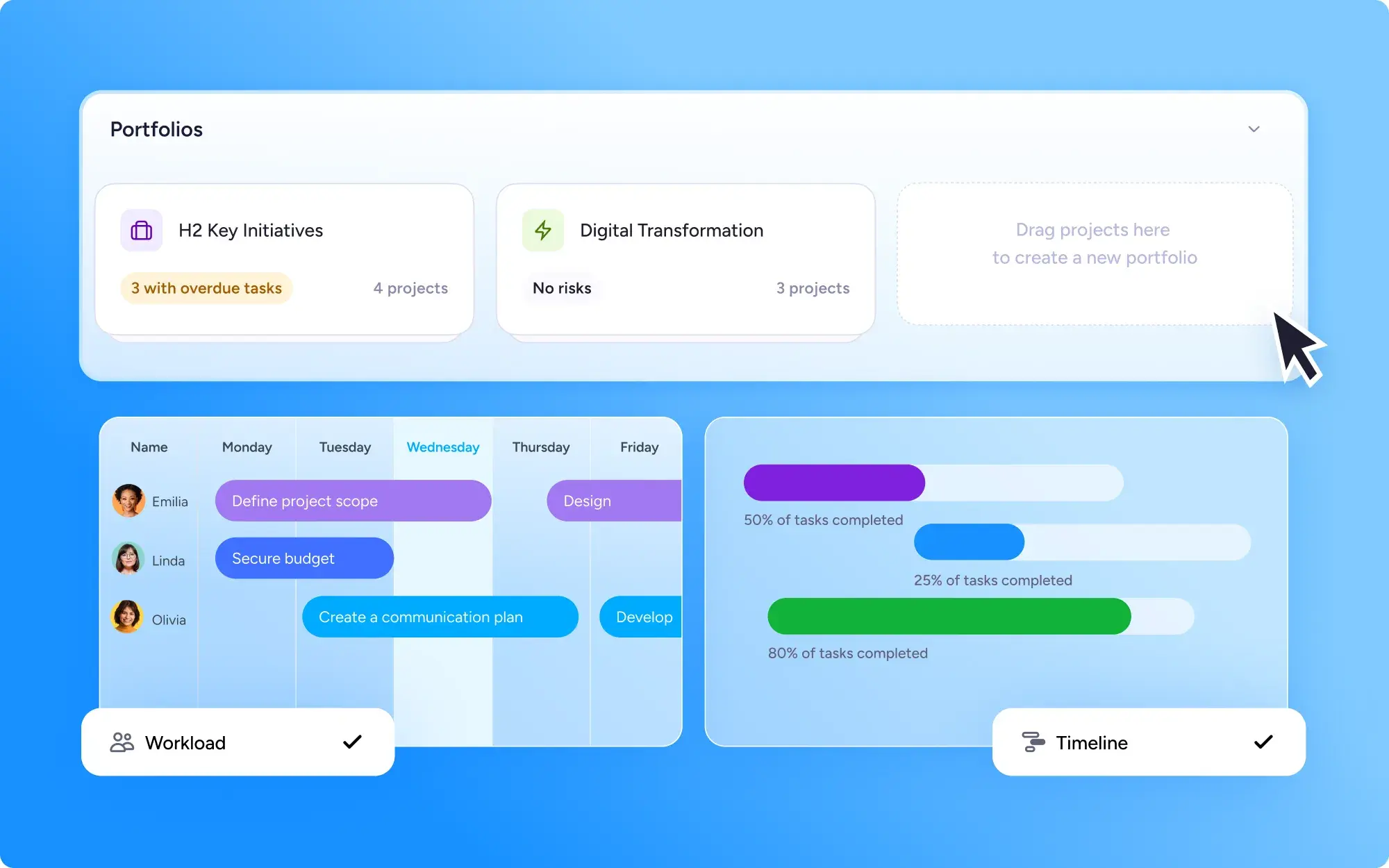
Agrupa proyectos relacionados en una cartera y haz seguimiento del progreso, los cronogramas y la carga de trabajo en una sola vista. Business incluye una cartera, y en Enterprise puedes crear varias.
Aprender másTu lista de proyectos ahora tiene su propio espacio en la página de proyectos, con pestañas para grupos y proyectos recientes, búsqueda y una nueva vista de tarjetas.
Aprender másBusca en tus proyectos, tareas y notas directamente desde la app móvil de MeisterTask, igual que en el escritorio.
Copia un elemento de la checklist de una tarea a otra, ahorrando tiempo al redistribuir el trabajo.
Conecta MeisterTask a Claude para crear, actualizar, buscar y compartir tus proyectos, tareas y notas. Lleva el trabajo de tu equipo a tus conversaciones con la IA.
Aprender másCrea y edita tablas directamente en Notes, lo que facilita organizar datos, comparar opciones y presentar información con claridad junto a tus tareas.
Añade o elimina automáticamente observadores de tareas cuando se active una regla de sección.
Aprender más
2 herramientas nuevas para que los administradores de equipo gestionen la carga de trabajo del equipo y planifiquen la capacidad entre proyectos. El widget de carga de trabajo del equipo, disponible en los planes Business, muestra las tareas y el estado del equipo de un vistazo en la pantalla de Home. El planificador de capacidad, una función del plan Enterprise, es una nueva vista para planificar la capacidad entre varios proyectos.
Aprender másReorganiza, muestra u oculta widgets en tu pantalla de Home para que tu información más importante esté siempre a la vista.
Aprender másTus campos personalizados ahora pueden aparecer como columnas en los informes y las exportaciones. Selecciónalos en el menú "Mostrar" y, si el mismo campo existe en varios proyectos, se combinará automáticamente en una sola columna.
Aprender másSi una tarea todavía está esperando a que otra termine, te avisaremos si intentas marcarla como completada.
Crea informes (y exportaciones CSV) de cualquier tarea agrupada por tus etiquetas personalizadas.
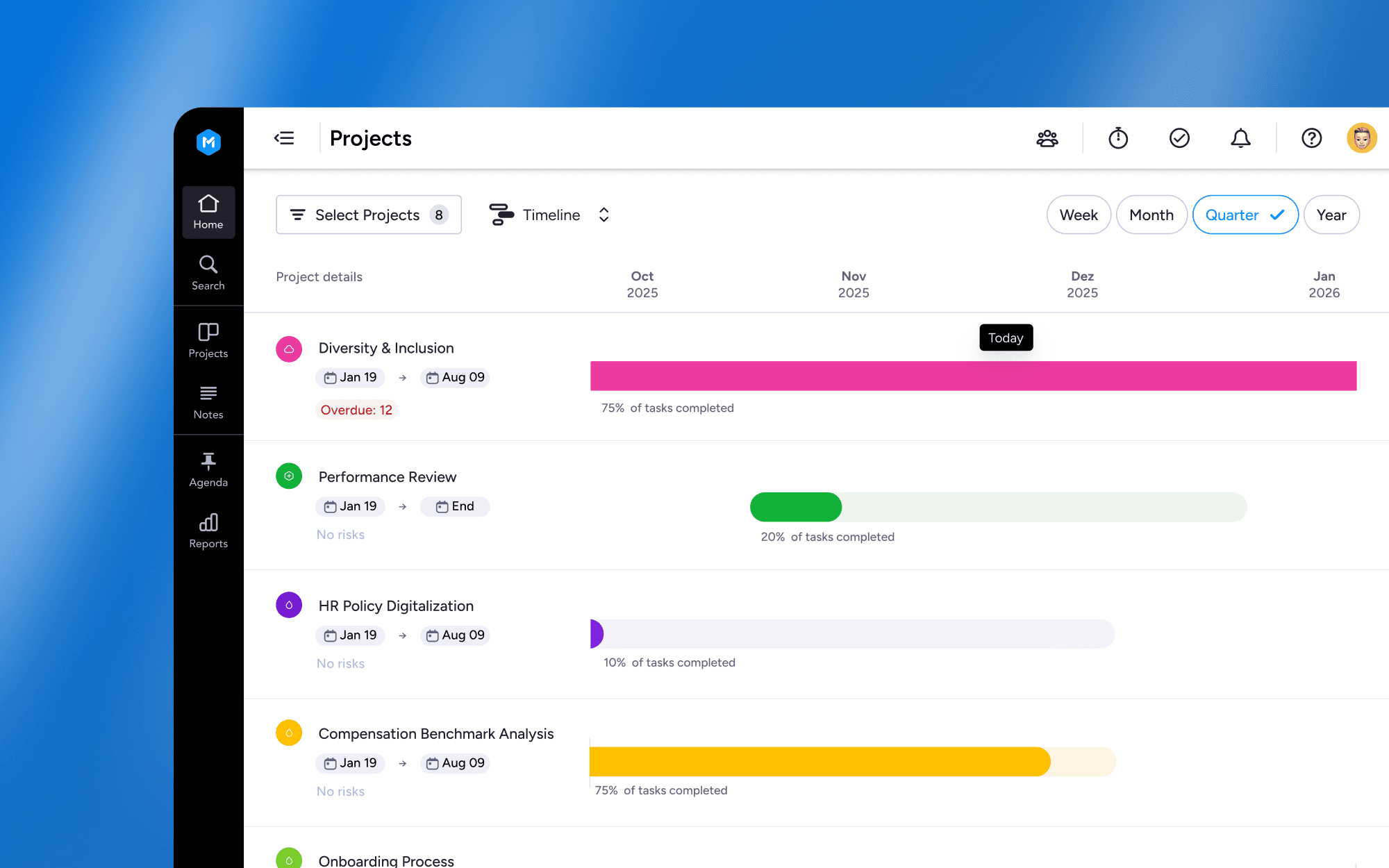
La nueva vista en Proyectos te permite visualizar cómo encajan los cronogramas de todos tus proyectos, al estilo de un diagrama de Gantt. Así puedes planificar con más inteligencia, detectar antes los riesgos de programación y ajustar los cronogramas al instante.
Aprender másOrdena los tableros de proyecto por fecha de vencimiento, etiquetas, persona asignada y mucho más para controlar cómo ves tu trabajo. Comparte tus vistas ordenadas con tus compañeros de equipo para estar alineados.
Las subtareas te ayudan a dividir el trabajo en partes manejables. Y ahora, al duplicar proyectos o tareas, puedes elegir duplicar también las subtareas que contienen.
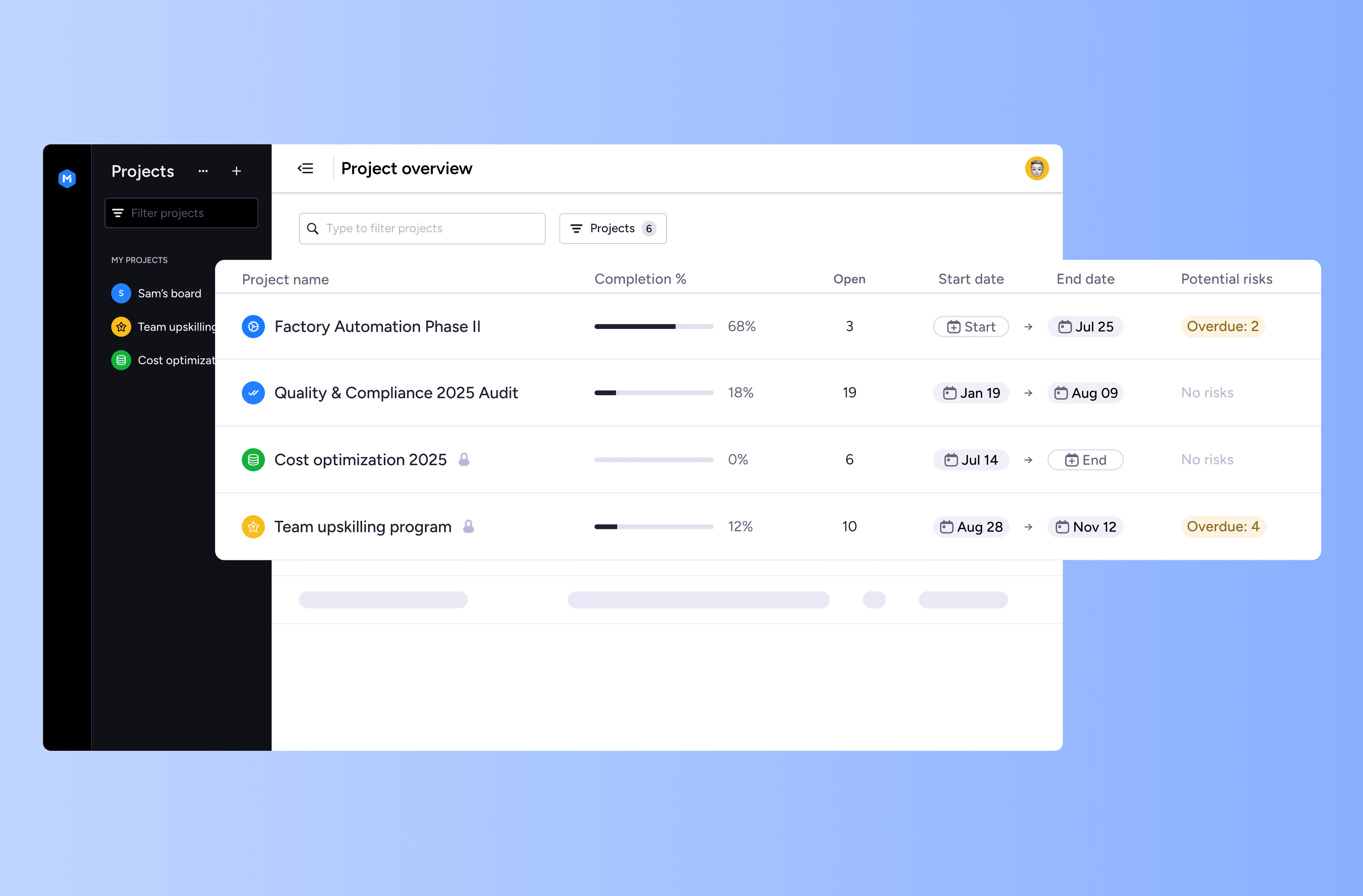
Ahora es mucho más fácil hacer seguimiento de varios proyectos a la vez. El widget de Proyectos en la pantalla de Home te permite añadir tus proyectos principales para ver su estado de un vistazo al abrir MeisterTask. Y la página de Proyectos renovada es tu espacio para supervisar todos tus proyectos y ordenarlos por métricas clave, como las tareas atrasadas.
Aprender másNuevos filtros de informes: consulta rápidamente las tareas vencidas y separa los elementos completados de los archivados para obtener información más precisa.
Vuelve rápido a lo importante: ahora puedes acceder a tus proyectos y notas vistos recientemente justo debajo de la barra de búsqueda en Home.
Mi checklist ahora admite markdown para un formato más claro y completo, tanto en web como en móvil.
Presentamos Home para dispositivos móviles: consulta rápidamente tus próximas tareas, el contenido al que has accedido recientemente y tus pendientes personales, todo en un solo lugar.
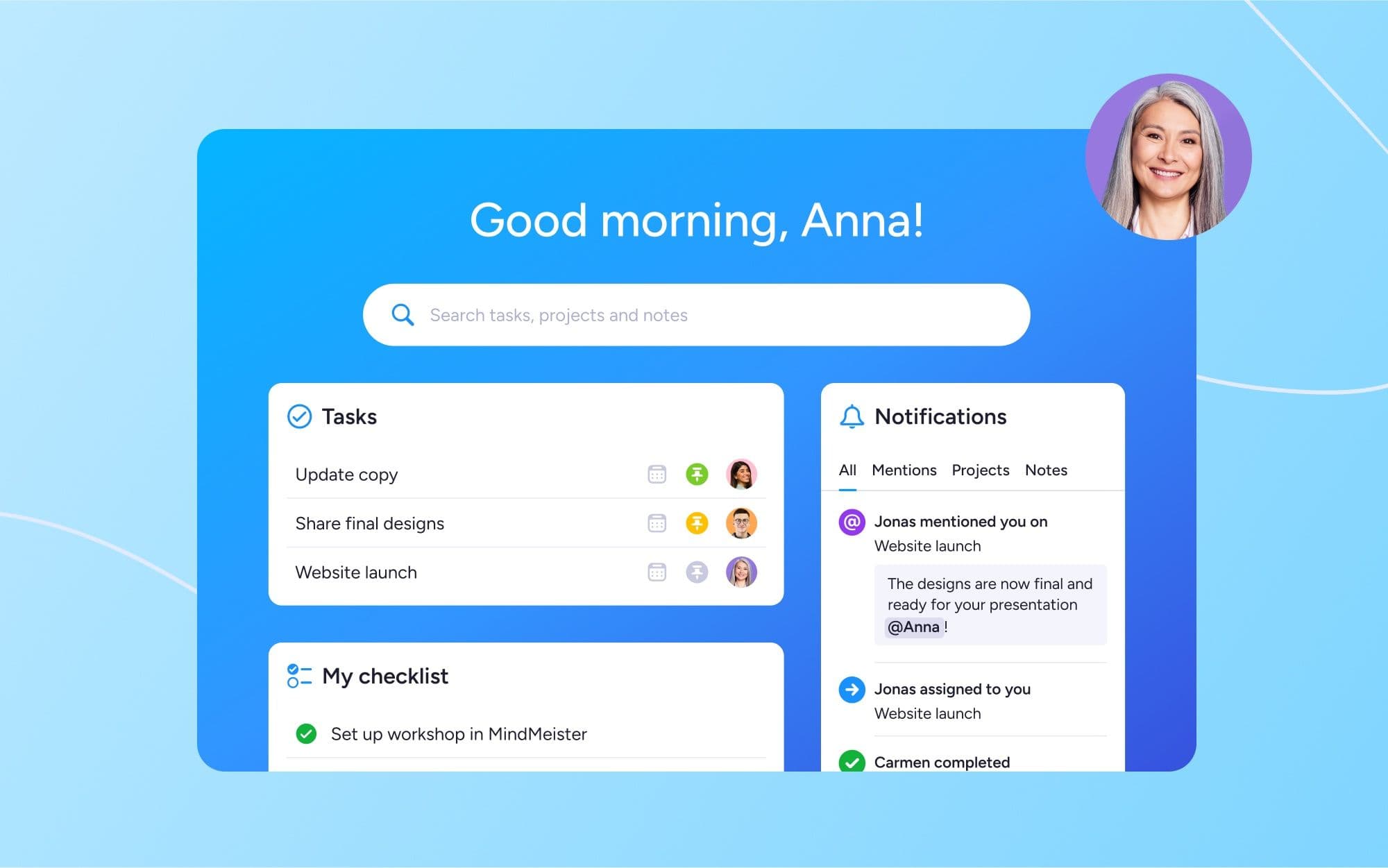
Te presentamos Home en MeisterTask: el nuevo espacio personalizable que te ayuda a empezar bien cada jornada laboral. Consulta tus próximas tareas, tus últimas notificaciones y tus pendientes personales, todo en un solo lugar. Revisa tus prioridades y encuentra tu enfoque del día, antes incluso de terminarte el café.
Aprender másPresentamos un nuevo rol "Visor", gratuito, disponible en todos los planes de MeisterTask. Puedes dar permisos seguros de Visor a tantos compañeros como quieras, para que puedan ver las novedades cuando les convenga, sin coste alguno.
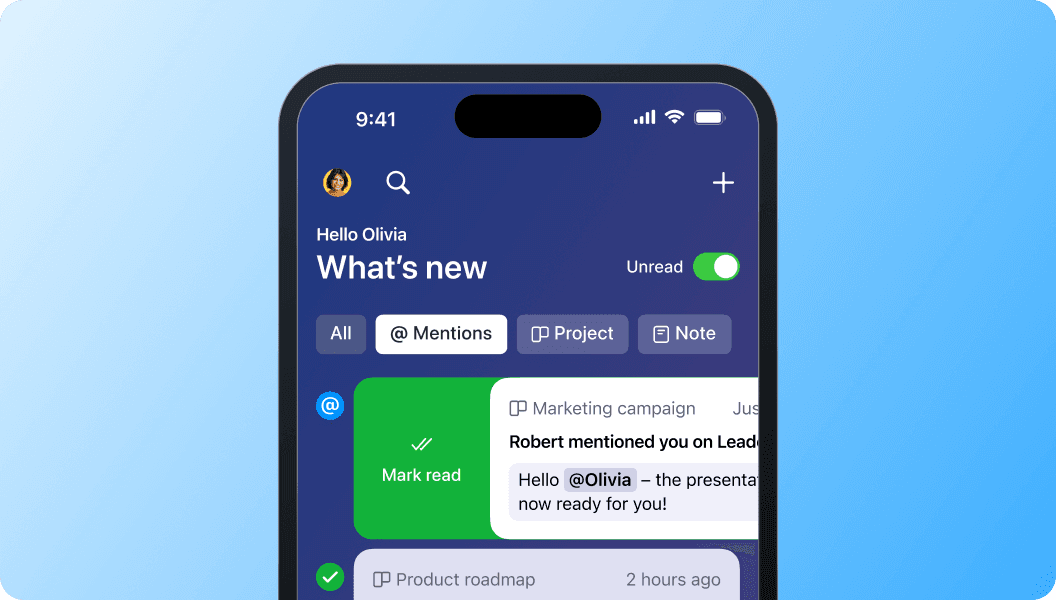
Nuevos filtros y funciones de uso compartido te permiten perfeccionar tus vistas para centrarte en las tareas y comentarios más relevantes, en el móvil y en tus proyectos.
Aprender másCada vez que uses un filtro en tus proyectos, ahora podrás cerrar la barra lateral de filtros de la derecha sin perder los filtros aplicados. Y lo que es mejor, ¡también puedes compartir tu vista filtrada con otras personas!
Un vistazo a hacia dónde se dirige Meister y a la nueva marca e identidad visual que lo acompaña.
Aprender másLa función de notificaciones en móvil se ha rediseñado por completo. Ahora todas las notificaciones de proyectos, tareas y, sí, por fin, notas, se agrupan en un solo lugar.
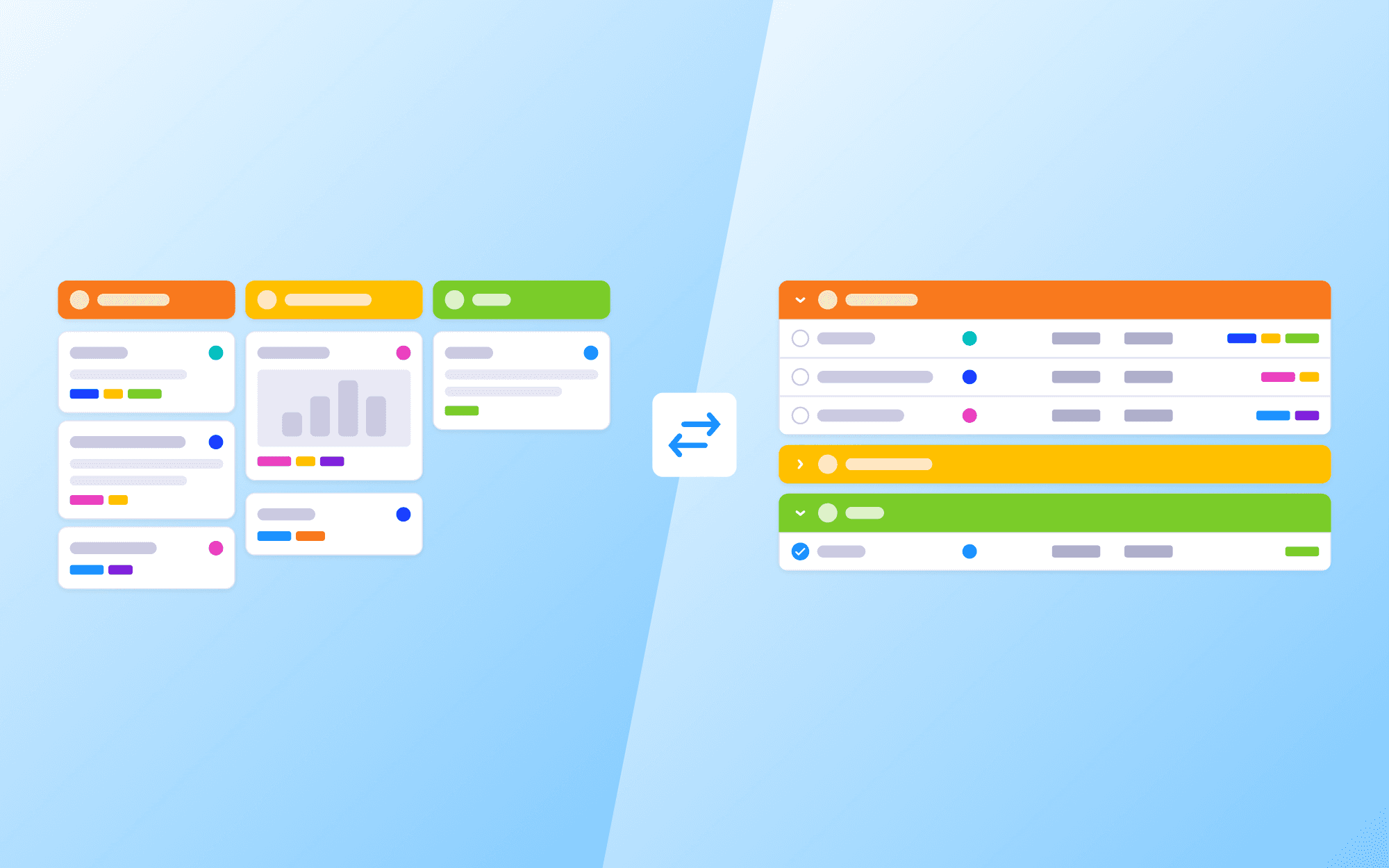
Usa nuestra nueva vista de lista para organizar y mostrar las tareas de los tableros de proyecto en una lista clara y fácil de leer. Esta vista de lista es perfecta para quienes prefieren un diseño simple y ordenado al tablero Kanban tradicional.
Aprender másCon la nueva función Páginas en directo, ahora puedes publicar páginas de Notes directamente en la web. Esta función está disponible para todos los usuarios de MeisterTask y se encuentra en cualquier página seleccionando el icono del globo en la barra de navegación derecha.
¡Por fin llega la edición desde el móvil! Crea, edita y comparte páginas en Notes desde tu dispositivo móvil, tanto en iOS como en Android.
Hemos aplicado algunos pequeños ajustes de accesibilidad al texto y a los iconos de nuestras apps móviles.
Cuando compartes o abres enlaces de Notes en tu dispositivo móvil, ahora se abrirán directamente dentro de la app de MeisterTask para una experiencia más fluida.
Ahora es más fácil encontrar los ajustes de apariencia, notificaciones e integraciones en MeisterTask. Hablando de integraciones, ahora también puedes encontrar enlaces a nuestros complementos de Outlook y Gmail en la página de integraciones.
¿El cursor parpadea sin parar? Escribe con IA para tener un primer borrador rápido. Nuestra herramienta de IA generativa actúa como un asistente personal que puede crear textos desde cero o mejorar lo que ya tienes. Encuentra la ayuda de redacción en el menú de Notes de la derecha y simplemente envía instrucciones por mensaje para que Meister AI te responda con un texto que puedas usar en segundos. Mejora tu redacción, resume contenido o crea párrafos totalmente nuevos.
Hemos hecho que los botones del encabezado del cuadro de diálogo de tareas sean más fáciles de entender.
Hemos cambiado la forma en que "obtenemos" los datos del proyecto, haciendo que los proyectos se carguen más rápido. La diferencia es especialmente notable en proyectos con grandes cantidades de tareas.
Compartir proyectos de equipo ya está disponible para los miembros del proyecto, no solo para los administradores. Simplemente haz clic en el botón del encabezado para copiar un enlace para compartir el proyecto con tu equipo.
Al pasar el cursor por los iconos de MeisterTask, ahora verás información sobre herramientas más clara y explicativa.
¿Te cuesta orientarte? Hemos añadido etiquetas a los iconos de la barra lateral para que te resulte más fácil encontrar la función de MeisterTask que buscas.
Hemos mejorado nuestro editor de notas en la web como parte del trabajo para llevar la edición de notas al móvil. No deberías notar nada distinto en la superficie, ¡pero por dentro todo ha mejorado mucho!
Seguimos trabajando a fondo para llevar toda la funcionalidad de Notes a nuestras apps móviles. Se ha lanzado el siguiente gran hito: ahora puedes ver los debates existentes y añadir nuevos comentarios.
Ahora es aún más fácil compartir tus notas con tu equipo, y aún más fácil añadir nuevos miembros a tu equipo.
Ahora es posible guardar un informe personalizado con hasta 200 proyectos. También hemos facilitado encontrar las opciones de exportación.
¿No recuerdas exactamente en qué nota estaba esa información? ¡No te preocupes, Meister AI al rescate! Haz una pregunta y nuestra búsqueda con IA revisará las notas a las que tienes acceso y te dará la respuesta.
Consulta quién aún no ha aceptado su invitación a tu equipo y cuándo caducarán las invitaciones.
Hemos empezado a llevar nuestra querida función Notes a nuestras apps móviles. Por ahora solo de lectura, ¡pero los debates y la edición están en camino!
Hemos hecho algunos cambios en cómo funciona compartir proyectos, y ahora es aún más fácil añadir colaboradores de proyecto a tu equipo.
Busca proyectos, tareas y notas, todo en un solo lugar.
Ahora es posible añadir tareas existentes como subtareas. Simplemente haz clic en "o enlaza una tarea existente" al añadir una subtarea.
Comparte notas fácilmente con todo tu equipo o con grupos de usuarios ya existentes.
Aprender másCon nuestra última actualización, ahora puedes gestionar, vincular y actualizar tareas sin esfuerzo directamente desde tus notas. Además, por primera vez, adjunta notas a tus tareas sin esfuerzo con nuestra nueva función de archivos adjuntos. Agiliza tu flujo de trabajo y mejora tu experiencia de gestión de proyectos con esta integración intuitiva y bidireccional.
Hemos añadido 5 nuevas plantillas de proyecto y 6 nuevas plantillas de nota para que sea aún más fácil dar el primer impulso a tu productividad.
Mantener el control de tus prioridades y tareas pendientes personales nunca ha sido tan fácil. Ahora es posible ordenar tus fijados personalizados de la Agenda. Aprovecha las mismas opciones de ordenación que puedes usar en las secciones de proyecto.
Las marcas de tiempo de los comentarios con más de 48 horas de antigüedad ahora muestran la fecha y hora reales. También hemos añadido un cuadro de diálogo de confirmación al desvincular subtareas de sus tareas principales. ¡Se acabaron las subtareas perdidas o solitarias!
Presentamos con orgullo nuestra función más solicitada de siempre: ¡las subtareas! Estructura tareas complejas dividiéndolas en subtareas más pequeñas y manejables. Cada subtarea incluye toda la funcionalidad que ya conoces y adoras de las tareas normales: elementos de checklist, etiquetas, fechas de vencimiento, personas asignadas, comentarios y mucho más. ¡Sub-lime!
Por fin, ¡todo en un solo lugar! Cambia rápidamente entre tus Proyectos, la Agenda, Informes y Notes con la barra lateral actualizada.
Ahora es mucho más fácil iniciar un nuevo proyecto. Al crear un nuevo proyecto, los usuarios pueden elegir entre un proyecto en blanco o una plantilla. Se han lanzado cinco plantillas para fines empresariales, personales y educativos: Kanban, Agenda de reunión, Gestión de proyectos, Planificación de lecciones y Planificador de tareas.
A partir de ahora, los administradores de equipo del plan Business tienen una mejor visión general de los datos de los proyectos de su equipo. Tienen la posibilidad de ver los datos de todos los proyectos en la sección "Proyecto", dentro de "Preferencias", incluidos los proyectos privados. Además, pueden exportar los datos de los proyectos como CSV y archivar o eliminar proyectos de forma masiva. Si los administradores no son miembros de un proyecto concreto, solo podrán ver información como: el nombre del proyecto, su estado y quién lo creó.
El cuadro de diálogo de tareas se ha vuelto mágicamente mucho más ancho de la noche a la mañana. Esto significa que, en adelante, será más fácil y claro para los usuarios añadir la información más importante a una tarea. Esto ofrece una mejor visión general de la información relevante del proyecto.
A partir de ahora, los administradores de equipo pueden añadir miembros externos del proyecto a su equipo directamente desde la pestaña "Acceso". Cuando se alcanza un determinado número de colaboradores externos en un proyecto, se envían correos de seguridad a los administradores de equipo para garantizar la seguridad de los datos.
Un administrador de equipo invita a usuarios a un proyecto y, si hay usuarios que pueden añadirse al equipo, el administrador tiene entonces la opción de invitarlos también al equipo. Aparece un aviso cuando se han agotado las licencias disponibles. El número de licencias se puede ampliar directamente desde MeisterTask.
Cada vez que un usuario invita a miembros a un proyecto, la invitación al proyecto va seguida de la invitación al equipo. Esto ocurre cuando el sistema detecta que esos usuarios también podrían formar parte del equipo. Los requisitos son que esos usuarios puedan añadirse como miembros y que quien invita tenga permisos para añadir miembros al equipo.
A partir de ahora será aún más fácil para los usuarios unirse a proyectos de equipo. Desde la barra lateral, puedes unirte a los proyectos haciendo clic en el signo "+".
Los equipos Business ahora pueden decidir si los proyectos que se crean son automáticamente visibles para todo el equipo o si son privados y los miembros del proyecto deben ser invitados. Los administradores de equipo pueden hacerlo haciendo clic en su avatar y en "Cuentas" -> "Mi equipo" -> "Ajustes" -> "Permisos" -> "Restricciones de MeisterTask".
Con los equipos Basic, ahora también es posible que los usuarios de Basic en MeisterTask formen un equipo y trabajen juntos en proyectos.
A partir de ahora, los usuarios pueden ver sus proyectos de equipo disponibles en la barra lateral, en "Otros proyectos", y también pueden buscar estos proyectos con la función de búsqueda integrada. Todos los proyectos a los que el usuario ya se ha unido se encuentran en "Mis proyectos". Los proyectos privados, que se diferencian de los proyectos de equipo, se marcan con un icono.
A partir de ahora, los proyectos de equipo son visibles para los usuarios de Pro y accesibles para todo el equipo. Además, también existe la posibilidad de crear proyectos privados, a los que los usuarios deben ser invitados.
A partir de ahora, los usuarios de Basic pueden probar la versión MeisterTask Business durante 30 días de forma gratuita. La versión de prueba se puede iniciar a través de los avisos de actualización en las funciones de Business.
A partir de ahora, los administradores de equipo pueden ver de un vistazo qué personas externas tienen acceso a los proyectos del equipo sin formar parte de él. ¡Solo tienes que ir al área de Preferencias en MeisterTask para verlo!
Aprender másEsta versión mejora la información a la que se puede acceder desde el icono de ayuda.
A partir de ahora tenemos disponible una nueva integración con Slack para todos los usuarios del plan Pro y superiores. Recibe notificaciones de MeisterTask, así como tu propio resumen diario de tareas, directamente en Slack. Configura notificaciones automáticas de proyecto en los canales que elijas para que tú y tu equipo estéis siempre al tanto de todo. Además, crea tareas y comenta en tareas ya existentes sin salir de Slack.
Aprender másEsta actualización permite celebrar con MeisterTask a partir de ahora. Cada vez que se completa una tarea, no hay notificaciones nuevas, se añade un nuevo miembro a un proyecto o se completa un elemento de la checklist, se celebra con cohetes, purpurina o confeti. Estas animaciones se pueden desactivar en "Ajustes" y "Apariencia".
Con esta versión cambia la vista de la pestaña de miembros en los ajustes del proyecto. Todos los miembros del proyecto se dividen en equipos (más de uno) y colaboradores individuales. Esta vista permite ver de un vistazo qué roles se han asignado a los miembros y en qué planes se encuentran. A partir de 10 colaboradores, será posible buscar miembros con el campo de búsqueda y filtrar por rol.
A partir de ahora, en los ajustes del proyecto se puede consultar si un proyecto es privado o si se ha asignado a un equipo. Además, ahora hay descripciones más detalladas disponibles para estas dos categorías. Con esta actualización, los archivos de exportación del proyecto mostrarán cuándo se cambió la visibilidad del proyecto y quién lo hizo.
A partir de ahora es posible ver información adicional del proyecto: el equipo al que pertenece, la persona que lo creó y la fecha exacta en la que se creó.
Aprender másHasta ahora los usuarios podían mencionar a @here, @all o al @nombre de un miembro del equipo. A partir de ahora, también pueden etiquetar a grupos en los comentarios y en las checklists. Esto hará que la comunicación dentro de la herramienta sea aún más precisa.
Con esta versión, hemos mejorado la navegación para nuestros usuarios. Siempre que aparece una lista desplegable de búsqueda de proyectos, se muestran los proyectos recientes para ejecutar acciones de forma más fácil y rápida.
Esta versión cambia el menú de informes, que ahora se abre al hacer clic en el nombre del informe. En los informes personalizados, ahora es posible personalizar más cambiando el icono.
A partir de ahora, los usuarios podrán elegir la misma combinación de iconos y colores para sus proyectos que ya se había incorporado en otras secciones de MeisterTask.
Para los usuarios de Pro en adelante, los últimos 3 proyectos en los que se ha trabajado activamente también son visibles en la barra lateral, lo que los hace más accesibles. Además, se sincronizan entre dispositivos: si se accede a un proyecto desde el móvil, también aparece en el escritorio.
A partir de ahora será aún más fácil acceder a los informes, ya que los informes rápidos y los informes personalizados están disponibles en la barra lateral. Los usuarios podrán reorganizar los informes dentro de estas categorías mediante arrastrar y soltar.
Encontrarás el nuevo menú debajo del nombre del proyecto, en el encabezado del proyecto. A partir de ahora es más intuitivo y sencillo acceder a los ajustes del proyecto. El menú tiene un nuevo diseño y se ha reorganizado para facilitar la navegación.
Con esta versión, hemos vuelto a ganar en intuición. A partir de ahora puedes ajustar los colores y los iconos directamente debajo del icono de la sección, ¡y hemos añadido más colores para elegir! El menú de sección también ha recibido una mejora: los ajustes se han movido al frente, se ha actualizado el diseño y los ajustes que más se usan aparecen ahora al principio de la lista.
A partir de ahora, buscar proyectos y cambiar de uno a otro es más intuitivo y sencillo. La búsqueda de proyectos está disponible en la barra lateral, debajo de los proyectos activos.
Eliminar proyectos será, por un lado, más intuitivo y, por otro, más seguro. Hemos vuelto a permitir eliminar proyectos activos, y el proceso incluye un paso adicional que requiere la confirmación del usuario para asegurarnos de que la eliminación no se hace por accidente.
La barra lateral ha recibido un lavado de cara importante. Su manejo también es mucho más sencillo: a partir de ahora ya no tienes que salir del proyecto activo si quieres cambiar a otros proyectos. Además, dispones de más espacio para trabajar en la Agenda y en Informes.
Esta actualización permite usar más colores al formatear las etiquetas que se asignan a una tarea.
A partir de ahora, las tareas asignadas u observadas como invitado son aún más fáciles de encontrar. En el panel, esas tareas se muestran claramente como tareas de invitado y, en la sección de agenda, puedes filtrarlas.
La gestión intuitiva es importante para nosotros, por eso ahora es mucho más sencillo eliminar tareas. Después, también deberás confirmar la selección para asegurarnos de que la eliminación es realmente lo que quieres.
Esta actualización permite usar más colores al diseñar el tablero de la Agenda.
Hemos simplificado la experiencia de usuario de las checklists, mejorado la función de arrastrar y soltar, y ahora se muestra el progreso de los elementos de la checklist.
Ahora te ayudamos a lograr la estrategia Inbox Zero aún más rápido. Los correos de una tarea concreta ahora se agrupan en un hilo, lo que te ayuda a tener una visión completa y a ahorrar tiempo.
Nunca ha sido tan fácil convertir correos de Outlook en tareas de MeisterTask. Con la integración optimizada de Outlook, elige entre convertir un correo en una nueva tarea o añadirlo a una tarea ya existente.
Hemos hecho que añadir archivos adjuntos a tus tareas sea aún más fácil. Presentamos nuestro selector de archivos renovado. Con un diseño renovado, adjuntar y subir archivos es más fácil que nunca. Y ahora también puedes añadir enlaces como archivos adjuntos a cualquier tarea directamente desde el selector de archivos.
Muy solicitada por nuestros clientes y disponible desde hoy: adjunta archivos de OneDrive a tus tareas y visualízalos como enlaces.
Hemos hecho que los filtros de proyecto sean más potentes añadiendo las opciones "Todas", "Cualquiera" y "Ninguna" a los filtros de etiquetas. Y hemos actualizado el filtro de fecha de vencimiento con las opciones "Vence en cualquier momento", "Vencida" y "Sin fecha de vencimiento", todo porque nos lo pediste.
Queremos que tu experiencia de usuario en MeisterTask sea lo más fluida posible. Hemos rediseñado el menú "Preferencias" para mejorar la facilidad de uso.
Quedan 88