
One view to plan them all
When you’re leading multiple teams or tracking parallel workstreams, you need a way to stay on top of it all.
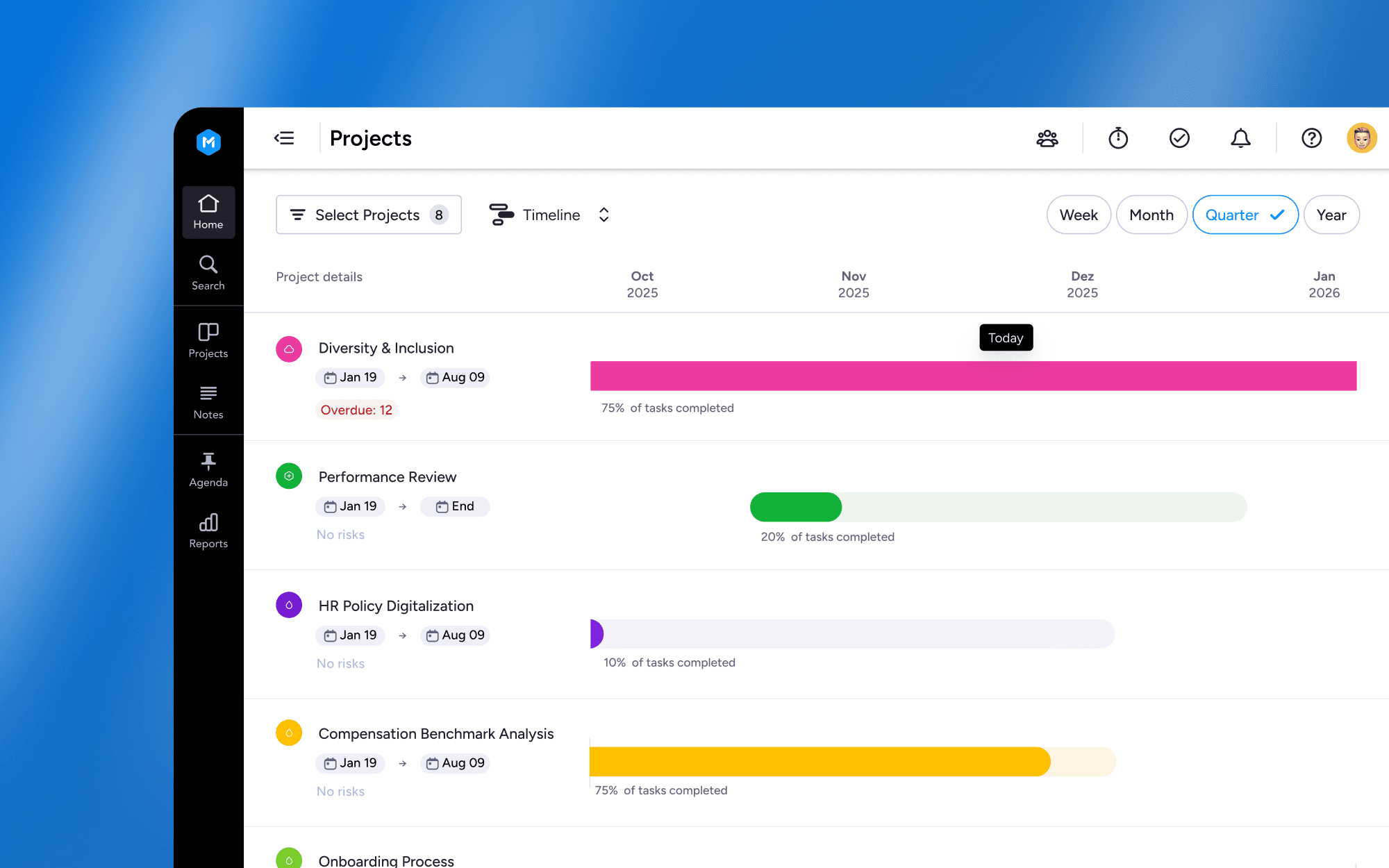
That’s exactly what the multi-project timeline delivers: a single place to visualize all your project timelines, so you can see how everything fits together.
So you can identify scheduling overlap, spot at-risk projects early and reallocate resources quickly.
How it works
You’ll find the timeline view option right on your Projects page. Use the view switcher dropdown to toggle it on.
Use the mult-project timeline view to:
Adjust timelines instantly. Reschedule projects right on the board.
Spot risks early. Easily see scheduling overlaps and the number of overdue tasks per project.
Focus on what matters most. Use filters to view only the projects that need your attention.
See the big picture. Zoom between month, quarter and year views.
Any unscheduled projects will be shown separately, and you’ll be prompted to add start and end dates to them.
Who’s it for
The multi-project timeline view is especially useful for:
Project owners managing multiple deliverables
Team leads juggling capacity across teams
Department heads who need visibility across workstreams
Any org handling complex, cross-functional projects
If your project list is longer than your to-do list, this view is for you.