

How does time blocking work?
Time blocking follows five simple steps:
List your tasks and estimate how long each one will take.
Rank them by priority and pick what matters most today or this week.
Block time for each task on your calendar to schedule deep-focus work during your most productive hours.
Add buffer blocks for email, meetings and anything unexpected.
Review at the end of the day or week and adjust your estimates.
For example, you might block two hours on Monday morning to prepare for Tuesday's presentation, and leave Slack messages and admin for a later block. In MeisterTask, tasks with a due date can sync to Google Calendar as events, so you see your deadlines right next to your time blocks.
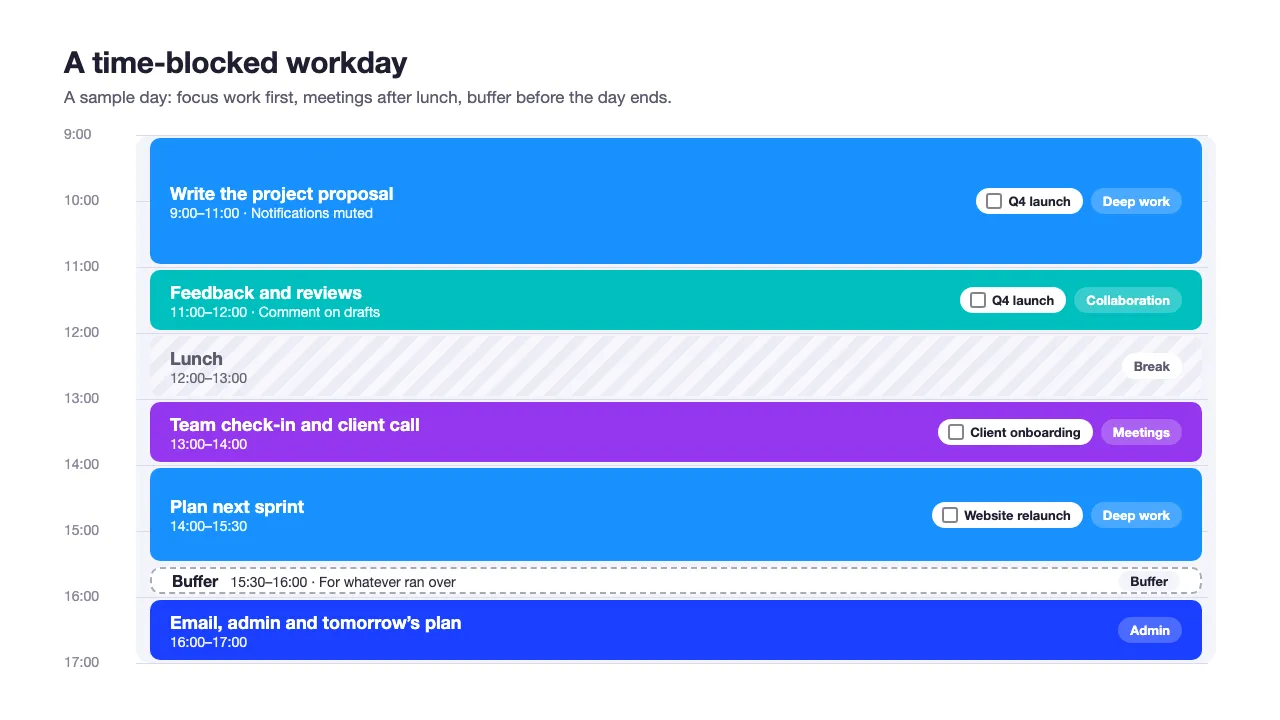
A sample time-blocked day: focus work in the morning, meetings after lunch and a buffer before admin.
What are the benefits of time blocking?
Time blocking helps you plan your day so you can move smoothly from one task to the next. It helps you to:
1. Get started
Big tasks can be daunting, and a seemingly endless list of to-dos can cause stress and inhibit your ability to focus. Organizing and setting specific start and end times for your tasks reduces task-related anxiety, making your workload feel more manageable. When you're able to reduce overwhelm for yourself and your team, it's easier to get the ball rolling and meet those deadlines.
2. Stay realistic
Time blocking forces you to think carefully about how long tasks take and to re-evaluate your estimates as you go. The more you use time blocking and time tracking, the more accurate your planning becomes. When your team tracks their time and shares how long tasks typically take, you can use this information to create realistic roadmaps and divide work fairly across the team.
3. Prioritize your tasks
The key to productivity is working on the right things at the right time. Time blocking helps you allocate enough time to priority work, so you don't end up rushing to complete important tasks or wasting time on low-impact tasks. It can also help less experienced team members practice setting priorities.
4. Control your workload
A time blocking method helps you prevent your workload from spiraling out of control. With your tasks planned out in your calendar, it's easier to spot when deadlines aren't realistic and when priorities need to be rearranged. It can also help team members identify prioritization conflicts early on and reach out to you for support before issues become critical.
5. Avoid procrastination
Procrastination thrives on open-ended time. It's easy to procrastinate when the whole day is stretching out ahead of you, but when you know you only have two hours to write a report, you're more likely to focus and get it done.
6. Stop context switching
Regularly switching between tasks (context switching) increases stress and eats into your productive time, because you need to refocus after every switch. Time blocking prevents your attention from being pulled in too many directions. When you decide that "for the next hour, I'm going to work solely on strategy development", you commit to ignoring distractions and fully engaging with the task at hand. This leads to better quality work and a better mood at the end of the day.
How to integrate time blocking into your existing productivity workflows
Some task management tools, such as MeisterTask, connect to calendar apps such as Google Calendar and Outlook, so your task deadlines show up as calendar events. This means you can see what is due and when, and plan your blocks around those task deadlines.
With MeisterTask's Google Calendar integration, you can sync all tasks in a project, only the tasks assigned to you in one project, or all tasks assigned to you across every project.
Step-by-step: how to set up time blocking in MeisterTask
Writing your blocks into a separate calendar works, but it quickly falls out of date when project plans change. With MeisterTask, your priorities and deadlines stay in one place, and you can see them right in your calendar. Here's how to set it up in three steps.
Step 1: Pin your priority tasks to your personal task board
Open a task in any project, click the pin icon and choose a section of your personal task board (in the left sidebar). You can rename and add sections, for example "Focus today" or one section per weekday, to sort your work before you block time for it. The full personal task board is available on Pro and Business plans. Basic plans include the Focus column.
Step 2: Sync your tasks with Google Calendar
Connect the Google Calendar integration, available on Pro and Business plans. Click your avatar in the top-right corner, select Integrations, click the Google Calendar icon and authorize access. Then add a configuration to choose what syncs: all tasks in a project, only the tasks assigned to you in a project, or all tasks assigned to you across every project. For full instructions, see the Google Calendar setup article in our Help Center.
Step 3: Plan your time blocks around your deadlines
Once synced, your tasks appear in Google Calendar as events on their due dates. Use them as anchors: block the time you need before each deadline and put demanding work in your most productive hours.
Pro tip: If plans change, you can update a task's due date directly in Google Calendar and the change syncs back to MeisterTask. Creating or deleting events in your calendar doesn't affect your tasks, so make bigger changes in MeisterTask.
Not using Google Calendar? MeisterTask's iCalendar feed, available on all plans, shows the tasks assigned to you that have a due date in Outlook or any other calendar app that supports the iCalendar standard.
How is time blocking different from time boxing?
While time blocking involves allocating time for a set of tasks, time boxing involves allocating a specific amount of time to individual tasks at a more granular level.
If you were taking a time-boxing approach to your work, your calendar would include more tasks, but each would take less time individually. They would also be more specific. For example, in a time-blocked calendar, you might have "Prepare for presentation with legal" from 9:00–11:00. In a time-boxed calendar, that block would be broken into much smaller, individual chunks.
Timeboxing is helpful if you have many small tasks to complete within a tight time frame. On the other hand, it can also add extra pressure, causing you to rush through your work unnecessarily. If multiple looming deadlines make you panic, this method probably isn't for you.
How is time blocking different from task batching?
Task batching is a subset of time blocking. It involves grouping similar tasks together and working on them in "batches", rather than moving between them sporadically throughout the day. You can group tasks by:
Task type (e.g., administrative tasks, strategic tasks)
The amount of concentration or effort they require (e.g. low-effort, high-effort)
Let's say that this morning, you have to reply to 8 emails, review 3 contracts and set up multiple tasks as part of a new team project. Rather than flitting between emails, contracts and task creation, you structure your time to work on the same type of tasks within a set timeframe. Task batching helps you optimize your time and work more efficiently by keeping you from constantly switching between contexts.
When is time blocking helpful, and when is it not?
Time blocking is a useful method for project managers and team leads, as these roles often involve balancing a variety of tasks and occasionally managing others' schedules. However, the beauty of time blocking is that it can be applied to a wide range of industries to boost workplace productivity.
The manufacturing sector: yes
Richard works in the manufacturing industry as an Administrator. He uses time blocking for tasks such as inventory management and quality control. This helps him manage his individual workload and meet departmental deadlines. He also recommends the method to Deja, the HR Manager, as a useful way to organize her limited focus time amid all the interviews and meetings she attends.
Not all professions will benefit from time blocking. If your job is extremely reactive by design and you don't work in a digital environment, time blocking in the traditional sense isn't a practical solution.
The manufacturing sector: no
Liza runs a production line. Time is of the essence, and one delay can cause more down the chain, affecting the overall delivery schedule. Because the work is physical, with each step sometimes taking only seconds, blocking out time in a calendar isn't logical or enforceable.
So, should you use time blocking?
Ultimately, whether time blocking is for you depends more on your profession and working style than your industry. However, if you do decide to give it a go, there are some common time-blocking pitfalls to avoid.
5 time blocking pitfalls to watch out for
As beneficial as time blocking can be, the following pitfalls could scupper your plans for a productive week. Here's how to avoid them and stay on track to success.
1. Falling into the planning fallacy trap
The planning fallacy is the tendency to underestimate the time and resources required to complete a task, despite knowing that similar tasks have generally taken longer than planned. This is due to an overestimation of our own abilities and a tendency towards wishful thinking.
One way to avoid the planning fallacy is to track exactly how long your tasks actually take, rather than simply guessing. Having the data will help keep your planning in check. The more you track the time spent on a particular type of task, the better you'll be able to plan for it next time.
Encourage your team to use MeisterTask's time-tracking feature to see how much time everyone spends on each type of task. This will help you improve your departmental planning and cross-team collaboration.
Research on the planning fallacy suggests taking the outside view: base each estimate on how long similar tasks took in the past, not on how smoothly you imagine this one going.
2. Over-scheduling your day
A common mistake when starting out with time blocking is filling every single minute of the day. This leaves no room for the unexpected: a colleague needing help, a task running over, or simply a moment to think. Always leave buffer time between blocks. A good rule of thumb is to schedule no more than 6 focused hours in an 8-hour day.
3. Ignoring your energy levels
Not all hours are created equal. Many people focus best in the mid-morning and feel a dip after lunch. Schedule your most demanding, high-concentration tasks during your peak hours and save admin and low-effort tasks for your lower-energy periods.
4. Being too rigid
Time blocking works best when it's a framework, not a cage. If something urgent comes up that genuinely needs your attention, it's fine to adapt your schedule. The goal is intentional planning, not inflexible adherence. Adjust, reschedule the displaced task, and move on.
5. Forgetting to review and refine
Time blocking improves with practice. At the end of each week, take 10 minutes to review: what worked, what didn't, and which tasks consistently took longer than expected. Use those insights to refine your blocks the following week. Over time, your estimates will get sharper, and your schedule will feel more realistic.
Time blocking for teams
Most time blocking advice is written for individuals. But if you manage a team, individual time blocking only solves half the problem. The real drain on team productivity isn't usually one person failing to block their time. It's the gaps between people: unclear handoffs, back-to-back meetings that cut into focus time, and no shared visibility over who is working on what and when. For broader tactics, see our article on time management strategies for teams.
Team time blocking works when everyone commits to a few shared principles:
Protect focus blocks across the team. Agree on core 'no meeting' hours. Even two hours a day without messages or calls gives everyone more time for focused work.
Make workload visible. When every team member's tasks and deadlines are in a shared system, you can spot overload before it becomes a crisis and plan meetings around existing commitments rather than against them.
Shift status updates async. The most common reason teams hold daily stand-ups is to answer 'what did you do yesterday and what are you doing today?', questions that a shared task board already answers. Replace the meeting with a quick async update and free up that time for focused work.
MeisterTask supports all of this in one place. Task assignments and due dates give the whole team a live view of priorities. With the Google Calendar integration, each team member can see their task deadlines right next to their meetings. And because tasks move through shared project boards, the next person can see when work is ready for them, without a handoff meeting.
What's the best app for time blocking?
A time blocking app needs to do two things well: show you everything you need to do and make it easy to plan when you'll do it. Most people end up bouncing between a task manager and a calendar app, and the friction of keeping both in sync is itself a drain on time.
MeisterTask bridges that gap directly. Tasks live on a visual Kanban board so you always have a clear picture of what's in progress, what's coming up, and what's waiting. Pin your priority tasks to your personal task board for a focused daily list. Then connect Google Calendar or another calendar app, and your task deadlines appear next to your meetings, so you can plan your blocks around them.
The result: your tasks, priorities and deadlines in one place, right next to your calendar. You can try MeisterTask for free and see how it fits your planning.
Time blocking templates
A time blocking template gives you a ready structure to drop your tasks into each week, so you don't rebuild your schedule from scratch. For example layouts, see our article on three time blocking template formats.
For a ready-made version, use our time management template, a MeisterTask template with weekday columns, priority tags and built-in time tracking so you can compare planned vs. actual on each block.
Time blocking is one of the most practical time management techniques available and one of the easiest to start using today. Whether you're a project manager juggling multiple workstreams or a team lead trying to protect your team's focus time, a consistent time blocking habit can transform how you and your team work.
Try pairing it with MeisterTask to keep your task list and your calendar connected and make every blocked hour count.
FAQs | Frequently asked questions about time blocking
Time blocking is a time management technique where you schedule specific blocks of time in your calendar for individual tasks or groups of tasks. Rather than working through a to-do list reactively, you commit to working on set tasks during set times, giving your day structure and your focus a clear direction.
Time blocking involves allocating a period of time to a set of tasks, while time boxing assigns a fixed, non-negotiable time limit to a single task. With time boxing, the task ends when the time is up, whether it's finished or not. Time blocking is more flexible; time boxing is more strict.
Task batching is a subset of time blocking where you group similar tasks together and work on them in one block. For example, rather than checking emails sporadically throughout the day, you batch all your email responses into a single 30-minute block. It reduces context switching and improves efficiency.
Yes, for most knowledge workers and project-based roles. Every switch between tasks costs time and focus, and time blocking directly addresses this by committing attention to one task or task group at a time. That said, it works best for roles that have some control over their schedule. Highly reactive roles may find it less practical.
Yes. When team members block their calendars and share their availability, it becomes much easier to schedule meetings, plan collaborative work and respect each other's focus time. Tools like MeisterTask support this by showing task deadlines in your calendar app and giving the whole team visibility over deadlines and workload.