
What is a product backlog?
A product backlog is an ordered list of all the work a team could do, ranked by value and urgency, continuously refined and used to feed planning. In Scrum, the product owner is accountable for the backlog. In practice, any team lead managing a queue of work benefits from the same structure. A backlog helps teams build, prioritize and maintain their work as a dedicated board, separate from the active sprint, so planning stays clean and priorities stay visible.
Think of it as the waiting room for your team's work. Everything that might get done sits there in order, and only the items that are ready and important move through to the active board. The waiting room stays orderly only if someone keeps it that way.
It helps to separate two things people often mix up. The product backlog holds everything the team might do, ordered by priority but not yet promised to any sprint. The sprint backlog is a subset of it: the items the team has selected and committed to finishing in the current cycle. Keeping them apart is what stops your active board from filling up with ideas that were never ready.
You do not need to run strict Scrum to get value from this. If you lead a marketing, ops or product team and you keep a running list of work, you already have a backlog. The question is whether it is ordered and current, or whether it has quietly turned into a place where ideas go to be forgotten.
What a healthy backlog gives your team
When a backlog is well kept, it stops being a chore and starts pulling its weight. A few benefits stand out.
Clear priorities. Everyone can see what matters most right now, so work starts on the right thing instead of the loudest thing.
Faster planning. When the top of the list is already ordered and ready, planning sessions become quick decisions rather than long debates.
Less waste. Outdated and duplicate ideas get removed before anyone spends time on them, so effort goes to work that still counts.
Shared visibility. A single ordered list gives the whole team, and any stakeholder, one honest view of what is coming and why.
These benefits compound. A trusted backlog gets used, and a used backlog stays healthy.
Why most backlogs fail
Three problems show up again and again, and they compound each other.
The first is length without triage. Every idea, request, and half-formed thought gets added; nothing gets removed, and soon everything is marked priority one.
The second is neglect. Items added six months ago still sit near the top, describing work that no longer matters. Nobody wants to spend an afternoon cleaning it up, so it grows heavier and less trustworthy every week.
The third is disconnection. The backlog lives in one place and planning happens in another, so nobody looks at the list until the day before planning. The team then spends the first twenty minutes of the meeting arguing about what should even be on the board. Picture a content team whose backlog holds 90 ideas, none ranked: every planning call restarts the same argument, and the two genuinely urgent pieces get lost in the noise. A backlog only earns its keep when it is part of your planning, which is where clear agile project planning makes the difference.
How to build a product backlog: five core elements
A backlog that works is built from a few habits, not from a heavier process. Here are the five elements that keep one healthy from the start.
1. Write clear backlog items
Every item needs a clear outcome. A common format is the user story: "As a [role], I want [outcome] so that [benefit]." For a marketing team, that might read, "As a campaign manager, I want a reusable launch checklist so that no step gets missed before go-live." If a full user story feels like overkill, a plain task description works, as long as it says what done looks like. Vague items like "website stuff" are the first thing to become dead weight, because nobody can tell what finishing them would actually mean.
2. Prioritize the backlog
Prioritization is where a backlog turns from a list into a plan. Three approaches cover most teams. MoSCoW sorts every item into must-have, should-have, could-have, and won't-have, which forces honest trade-offs. An effort-value matrix plots each item by how much work it takes against how much value it returns, so quick wins rise to the top. And for teams that find MoSCoW overkill, a simple top-10 rule works well: keep only your ten most important items ranked, and let the rest wait. A small ops team, for instance, might keep just ten ranked requests live and park everything else until a slot opens. For a deeper look at the options, see these task prioritization methods.
3. Epics vs. tasks
Large initiatives rarely fit into a single sprint. An epic is a big piece of work, such as "launch the new customer portal," that you break into smaller, sprint-ready tasks. Splitting epics early keeps your backlog made up of items a team can actually finish, and it makes prioritization far more accurate because you are ranking real work rather than vague ambitions. A good test: if an item cannot plausibly be completed in a single cycle, it is an epic and needs to be broken down.
4. Acceptance criteria
Each item needs a clear definition of done before it enters a sprint. Acceptance criteria specify what must be true for the work to count as finished, which removes the "is this done?" debate later. Setting a shared Definition of Ready for items before they move into planning keeps half-baked work off the active board and protects the team from starting work that stalls halfway through.
5. Make refinement a routine
A backlog decays if you only touch it under pressure. The fix is a short, regular refinement session, around 30 minutes a week, rather than a full ceremony. In that window, you clarify upcoming items, re-rank them, and drop what no longer matters. Making it a routine keeps the list trustworthy and sets up the maintenance habit covered later. Skip it for a month, and the backlog quietly slides back into a dumping ground.
Setting up your backlog in MeisterTask
MeisterTask gives you a straightforward place to run all of this on a Kanban board, with your backlog kept separate from active work. Here is a setup that holds up as your list grows.
Create a dedicated backlog project, separate from your active sprint board. This keeps ideas and future work from cluttering the tasks your team is delivering right now.
Add backlog items as task cards, each with a title, a short description, a priority tag and an effort estimate in a custom field. That gives you everything you need to sort and rank later.
Use sections to organize by priority tier: Must do, Should do, Could do and Parked. Dragging a card between sections becomes your prioritization ritual, and the board shows the whole team where things stand.
Link to your sprint board. When an item is ready for a sprint, move it into the active project so the backlog only ever holds work that is still waiting.
Schedule a weekly 30-minute refinement as a recurring task, assigned to the product owner or team lead, so grooming never gets skipped.
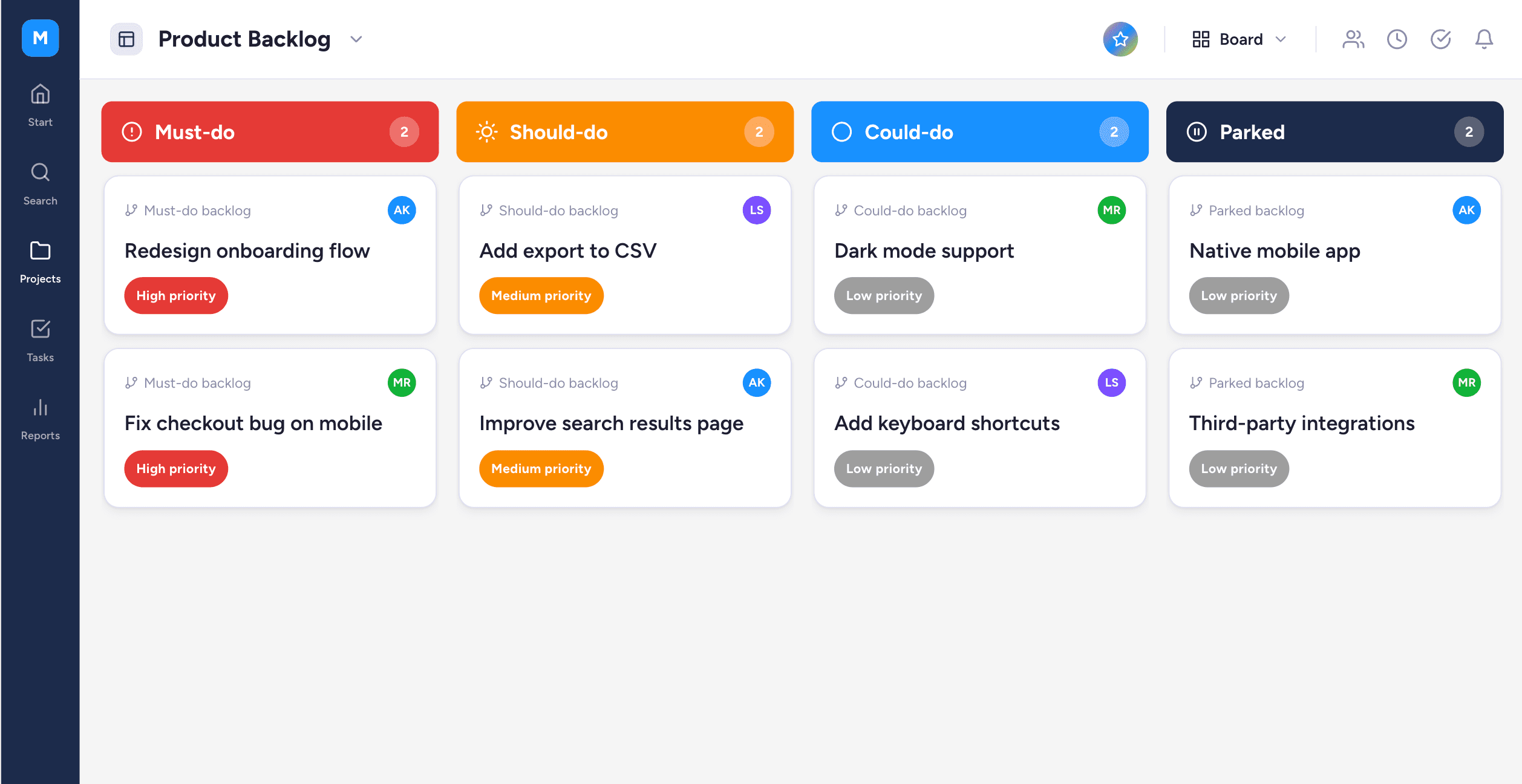 Take a marketing team, for example. Campaign ideas land in Parked, get promoted to Could do once they have an owner, and move up to Must do when a launch date is set. By the time an item reaches the top, it already has a description, a priority tag and an effort estimate, so moving it to the sprint board is a single decision rather than a fresh discussion.
Because MeisterTask is hosted in Germany and ISO 27001-certified, teams in regulated industries can access this structure without sending their planning data to a US server. If you want a head start, the agile board template already includes a backlog section alongside your active workflow, and the broader agile project management use case shows how the pieces fit together.
Backlog refinement: how to keep your backlog healthy
Refinement is the maintenance work that keeps a backlog from turning back into a graveyard. Run it in four steps.
First, review and remove outdated items, so the list reflects what the team actually intends to do. Second, re-estimate effort on large items, since your understanding of the work sharpens over time. Third, add acceptance criteria to upcoming items so they are ready when planning begins. Fourth, re-prioritize based on the current business context, because last quarter's priorities are rarely this quarter's.
Aim for a 30-minute cadence, run mid-sprint rather than the day before planning, so the work is spread out and nobody is scrambling. Keep the session focused on the top of the list, since those are the items closest to being picked up, and leave the deep backlog for a lighter quarterly clean-out. This rhythm also draws on the same discipline behind Kanban prioritization, where limiting work in progress keeps the whole system moving. Once your backlog is groomed, sprint planning becomes straightforward because the hard decisions are already made.
Keep your backlog working for you
A good product backlog is not a document you write once. It is built from clear items, ordered by a prioritization method your team trusts and kept honest by a short refinement routine. Get those three habits in place and the list starts doing its job, pointing everyone at the right work next.
MeisterTask brings that structure into one secure place, where your backlog, priorities and active work stay visible and connected instead of scattered across tools.
 Build the habit now, and your next planning session will run on a backlog you can actually rely on.